PERMISSION REQUIRED: You need the Admin permission to turn on Appointment Requests for the clinic
Appointment Requests allow patients and their caregivers to request appointments via the patient portal. This is an optional scheduling feature and must be enabled by a clinic administrator.
IMPORTANT: Before you Turn On Appointment Requests for your clinic, you need to configure your Location and Patient Case settings. These settings will determine what your patients will see when requesting appointments via the patient portal. For more information about getting started, see Appointment Requests Overview.
Turn on Appointment Requests for the Clinic
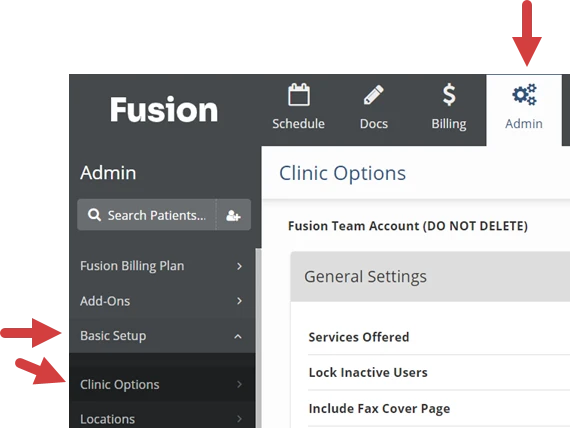
- Navigate to the Admin tab.
- Click Basic Setup.
- Click Clinic Options.
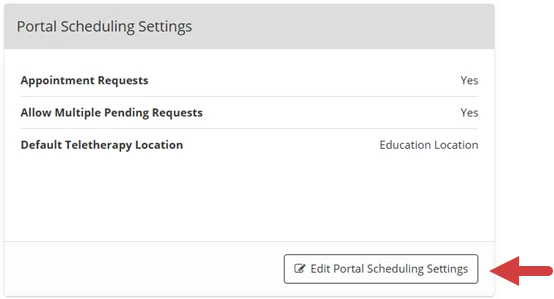
- Scroll down to the Portal Scheduling Settings card.
- Click the Edit Portal Scheduling Settings button.
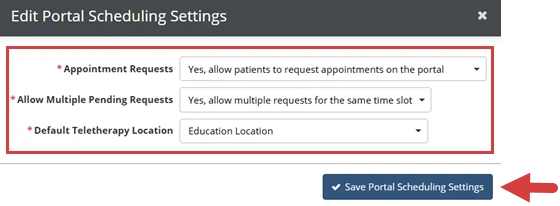
- Select Yes, allow patients to request appointments on the portal in the Appointment Requests dropdown.
- Select either Yes, allow multiple requests for the same time slot or No, only allow one pending request per time slot in the Allow Multiple Pending Requests dropdown.
- If you select "No, only allow one pending request per time slot", a requested time slot will be unavailable to other portal users while the request is pending.
- If you select "Yes, allow multiple requests for the same time slot", a requested time slot will be available to other portal users while the request is pending.
- Select the Location that will be associated with teletherapy appointment requests in the Default Teletherapy Location dropdown. This option is only available for clinics using the Teletherapy feature.
- If you select Don't allow teletherapy for appointment requests, patients will not have the option to request a teletherapy appointment via the portal, but could still request an in-person appointment for locations & patient cases that allow appointment requests.
- Click the Save Portal Scheduling Settings button.