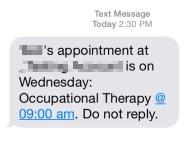
You can set up email or text message reminders for your patients and their contacts to make sure they remember appointments. If your clinic has set up appointment reminders, a patient's contact will receive reminders after you enable reminders for that contact in the patient's chart. If a patient has multiple appointments within the same hour block, their reminders will be combined into one message. If an appointment's status has already been changed to "Patient Canceled," "Clinic Canceled," "No Show," or "Checked-In," reminders for that appointment will not be sent. Recipients are not able to reply to reminder messages.
A clinic admin must Set Up Appointment Reminders for the Clinic before you can enable reminders in the patient chart.
Reminder emails for teletherapy appointments have a way to join the session.
IMPORTANT: There is a fee associated with SMS/Text appointment reminders. These will be charged per reminder sent. These charges will appear on the following month's Invoice.
Jump to Section:
Enable Reminders for a Patient
Enable reminders for each patient contact that should receive appointment reminders. A patient may have a Primary Contact (the patient or primary caregiver) as well as one or more Alternate Contacts.
- Open the Patient Chart.
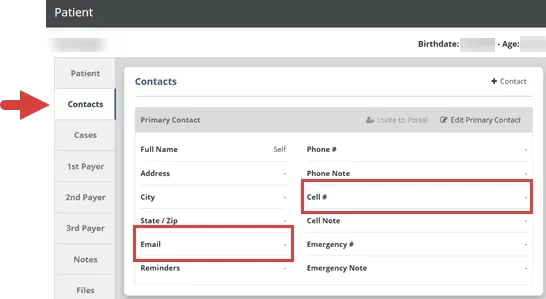
- Click the Contacts tab or scroll down to the Contacts section.
- Make sure the contact has an Email (for email reminders) or Cell # (for text message reminders).
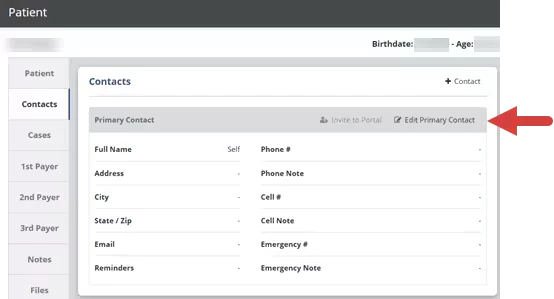
- Click Edit Contact.
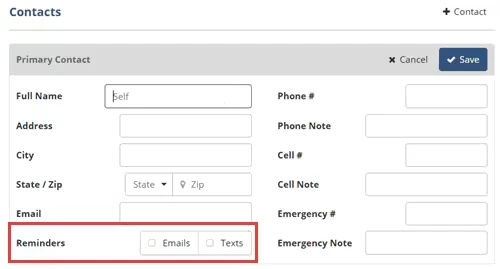
- In the Reminders field, click the Emails and/or Texts checkboxes to enable reminders.
NOTE: If the Email or Text checkbox is greyed out, it means that a clinic administrator has not Set Up Appointment Reminders for the Clinic for that type of reminder.
- Click the Save button.
Obtain Consent
Prior to sending your first text reminder, you must obtain an agreement from the recipient to communicate with them. This is often referred to as "consent". You must make clear to the recipient that they are agreeing to receive messages of this type. You will need to keep a record of the consent, such as a copy of the document or form that the message recipient signed, or a timestamp of when the customer completed a sign-up.
Sample Reminders
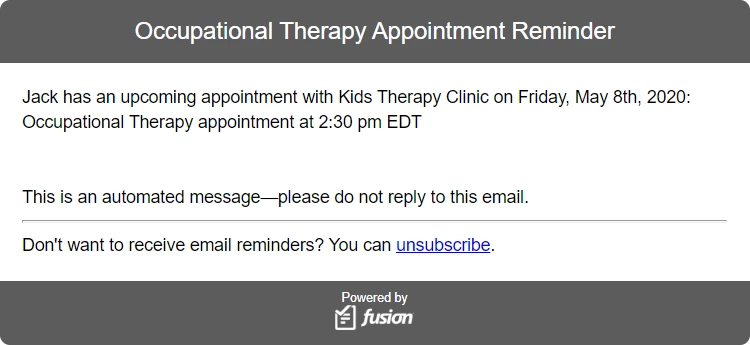
An email reminder will look similar to this:
A text message reminder will look similar to this and will include the appointment date: