


REQUIRED PERMISSIONS: You must have a Data Collection account and Therapist permissions or higher to use this feature.
You now have the ability to access your Data Collection portal account directly from your account.
Jump to Section:
Overview
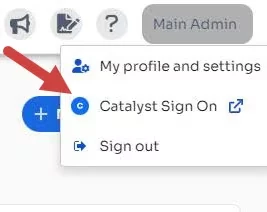
- Click on your name in the top right corner, and you will see an additional drop-down option called Catalyst Sign On.
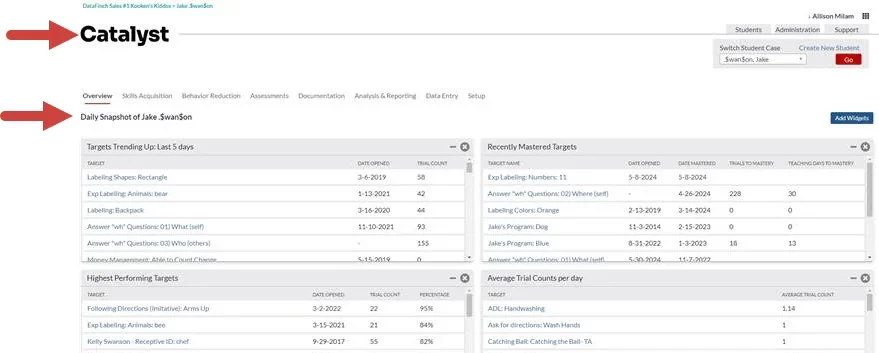
- After clicking Sign On, a new tab launches in your browser and opens the Student Daily Snapshot page in your Data Collection portal account.
Two configurations must be set up FIRST to use this feature. These may require your Administrator to complete these steps:
- Your Data Collection integration must be enabled from the Organizations tab.
See Data Collection Integration: Enable Integration for more information. - Your staff account must be matched to your Data Collection staff account.
See Data Collection Integration: Staff Setup for more information.
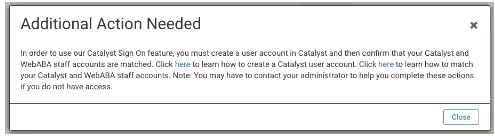
If these are not set up, you will either not see the Sign On option or you will receive the following error message below:
Frequently Asked Questions
I’m not seeing the Data Collection Sign On Option in my drop-down. What should I do?
- Make sure you have Therapist level permissions or higher. You may need to contact your Administrator to make sure that you first have your Data Collection integration enabled in your account AND that your staff account has also been matched to your Data Collection staff account within the system. You must be created as a staff member in both systems. If all of these steps have been completed and you are still not seeing the Data Collection Sign On option then please email for support here ABAtherapy.Support@ensorahealth.com.
Can I use this sign on option to log into the Data Collection app?
- This feature allows you to launch the Data Collection portal directly from your system account so that you don’t have to log into both platforms separately to access the portals. However, this does not apply to the Data Collection app. You will still need to sign in separately to the app to use the Data Collection application.
Can I launch my system portal from the Data Collection portal?
- Currently, this will be only a one-way sign on option where you can launch your Data Collection application from within your system account, but not the other way around. So, if you want to sign in to your applications only once, log into your system account first and you can log into your Data Collection account from there.
Will logging out of my account automatically log me out of the Data Collection portal or vice versa?
- No, you will still need to log out of both applications individually.