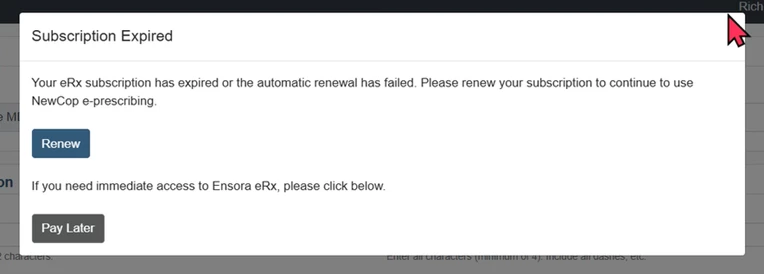
Check the eRx subscription status of prescribers within the practice and make payments in the subscription services section. eRx Subscription payments are processed monthly using Stripe.
NOTE: Not all providers pay for eRx services through the system. If you have questions about your eRx subscription, please contact your EMR vendor.
When logging in before making your first payment, or renewing an expired subscription, there is an eRx subscription payment due notification.
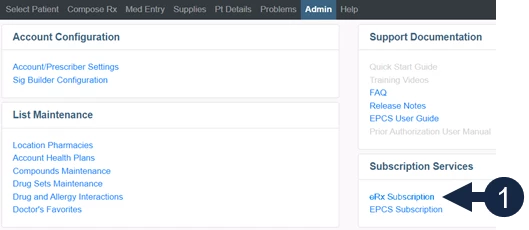
- Click the eRx Subscription link in the Subscription Services section on the Admin tab.
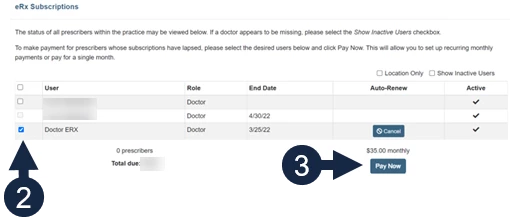
- Click the Checkbox next to the prescriber name.
NOTE: Use the filters to make it easier to locate a prescriber name.
- Location Only: Only display doctors working at the active location.
- Show Inactive Users: Display inactive users in italics.
- Click the Pay Now button.
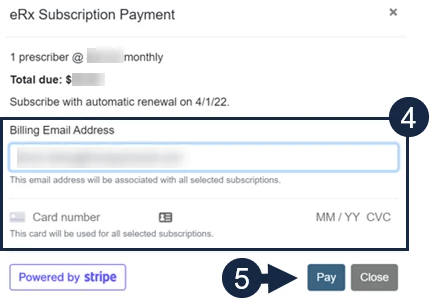
- Enter a Billing Email Address and Credit Card Information.
- Click the Pay button.
NOTE: You will be emailed a receipt each time a monthly payment is processed.