


Jump to Section:
How to Understand Credit Card Reporting
With the Merchant Account, there are three types of reporting that you can view:
- Merchant Account Activity
- Comprehensive Transaction Detail Report
- Detailed Deposit Report
Merchant Account Activity
The Merchant Account Activity is accessed through Reports and then Merchant Account Activity. There are a number of selection options that you can use to select the data for the reports:
- Choose Practice - If you are connected to only one practice, the system will default to that practice
- Payment Status - If you would like to view just one category of transactions
- Choose Date - You may use a preset date option or select a Custom Date Range
You may also sort the data by clicking on the column headers or download the data into a CSV file by clicking on the folder icon at the bottom of the screen.
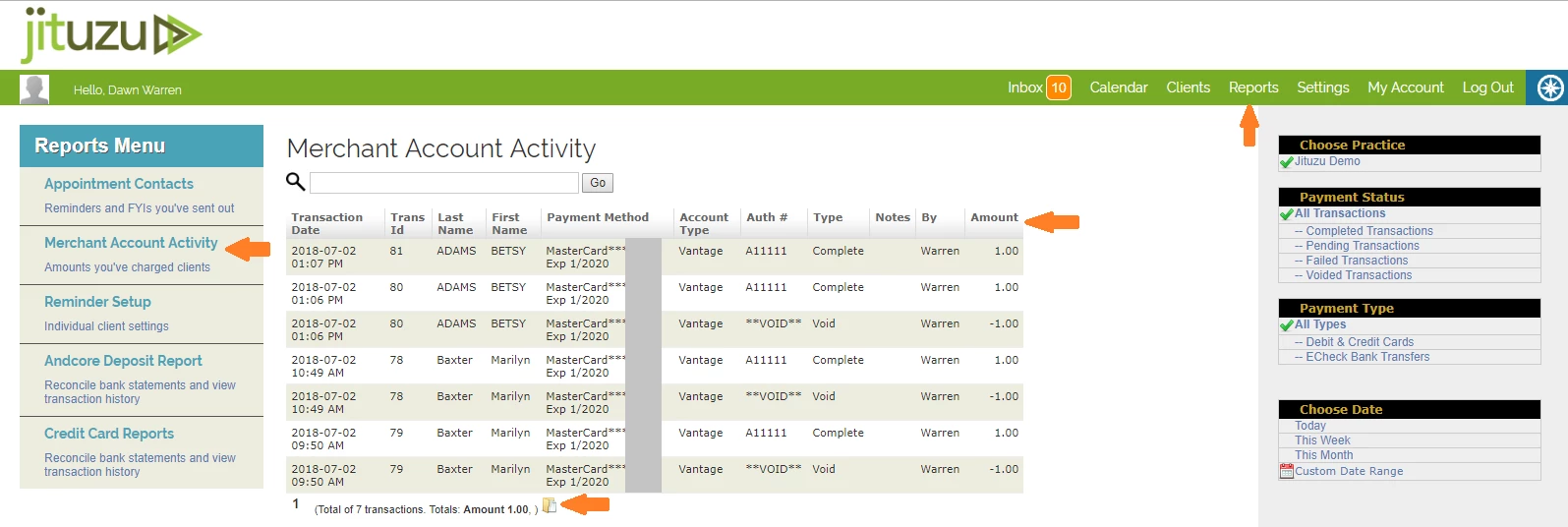
The Trans ID in the Merchant Account Activity correlates to the Comprehensive Transaction Detail Report and the Detailed Deposit Report.
[Back to Top]
Comprehensive Transaction Detail Report
The Comprehensive Transaction Detail Report gives the specific details on Settle Dates, Fees and Net Amounts. This report may be sorted by header column and downloaded by clicking the Export button.
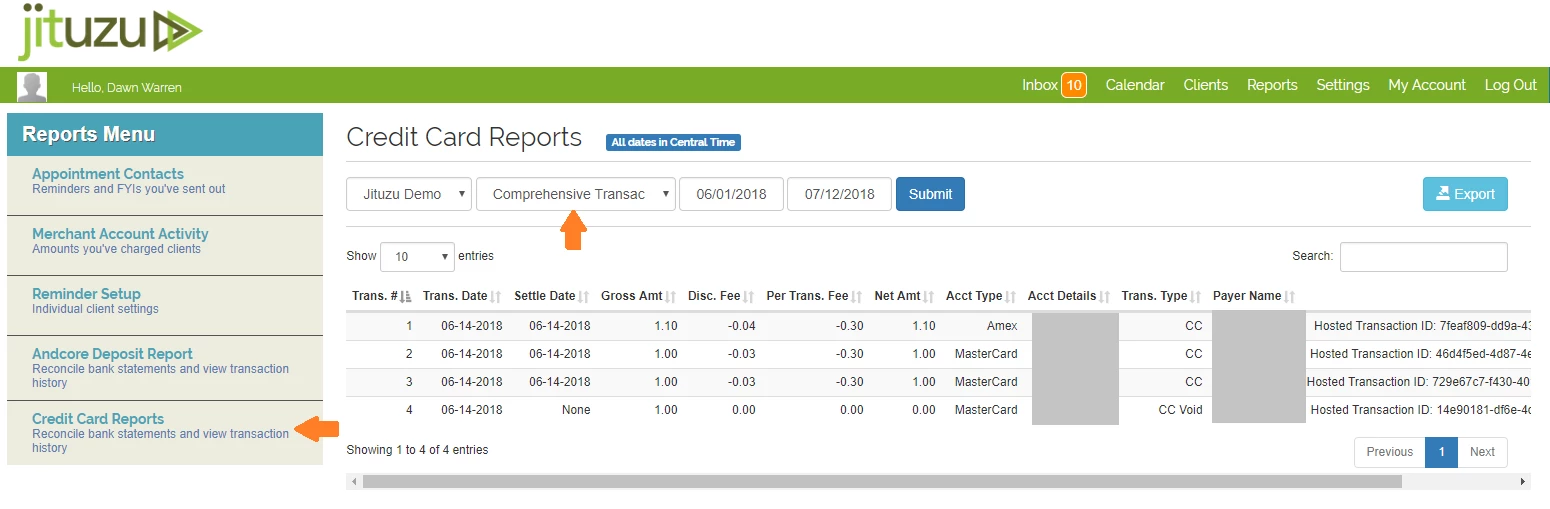
Definitions:
- Trans Date - This is when the date that the transaction was created.
- Settle Date - This is the date when the transaction was settled or "swept".
- Gross Amt - This is the gross amount that was charged to the client.
- Net Amt- This is the amount deposited in the bank account for this charge. This is the gross amount less the fees.
- Acct Details - This is the last 4 of the card holder card number
Detailed Deposit Report
The Detailed Deposit Report shows all the deposits and debits made to your bank account for the Merchant Account. This report can be pulled by whatever date range desired, sorted by clicking on the column headers and a Export can be done into a CSV file that is readable by Excel.
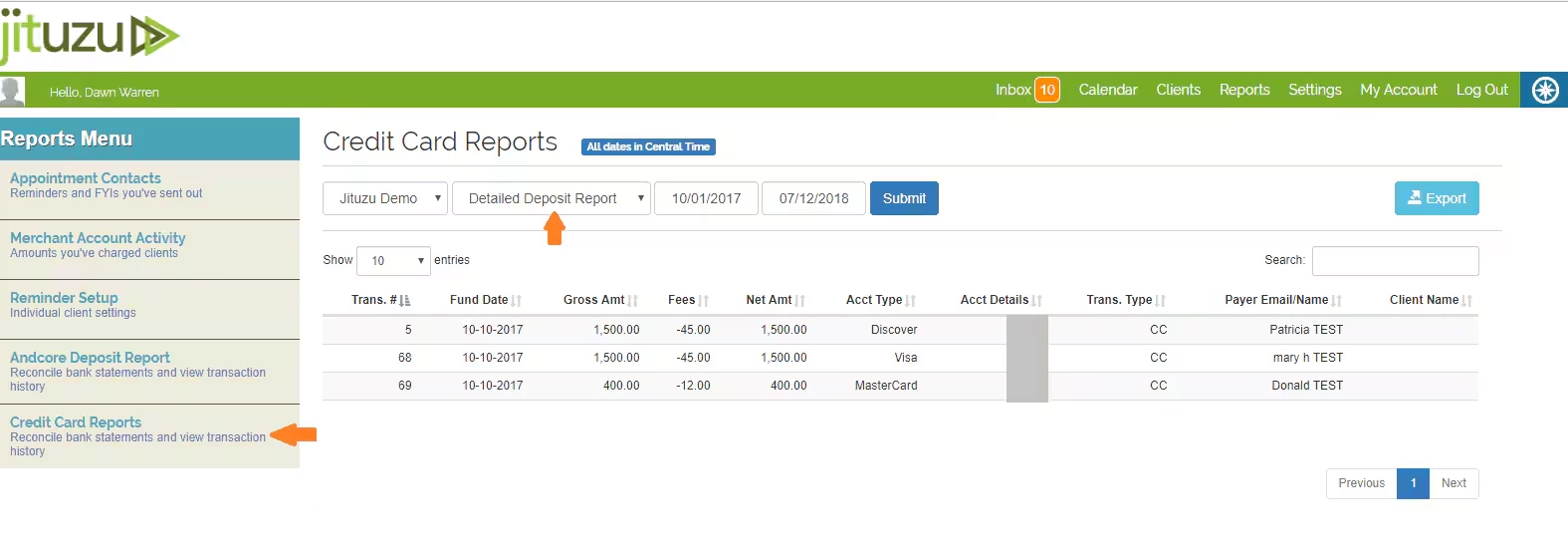
Definitions:
- Trans # - This is the transaction number that flows throughout all the reports that identifies a particular transaction.
- Fund Date - This is when the money is funded by the credit card processor and sent to your bank account.
- Net Amt - This is the amount that is deposited in your bank. It is the Gross Amt less the Fees.
- Trans Type - This is the transaction type. CC stands for Successful Charge.
Trans Type Definitions:
| CC | Successful Charge |
| CC Decline | Declined Transaction |
| CC Void | Voided Charge |
| CK | Debit/Withdrawal from merchant's account (e.g. if a refund was issued) |
| -CK | Credit/Deposit of funds into merchant account |
| -CK Return | Return on funds that Vantage tried to deposit into the merchant's account |
| -CK Return Fee | Fee on returned deposit into merchant's account |
| -CC Refund | Refunded Transaction |
| -Chargeback Fee | Chargeback fee paid by merchant |
| -Chargeback | Actual chargeback/disputed amount (amount of original CC charge being withdrawn from merchant bank account) |
| +Chargeback Amount | Disputer amount returned back to merchant's bank after they've won the dispute (amount of original CC charge) |