Error Messages
Category: Acknowledgement/Rejected for Missing Information - The claim/encounter is missing the information specified in the Status details and has been rejected. Status: NUBC Condition Code(s)
Resolution
- Open the Change Time Window.
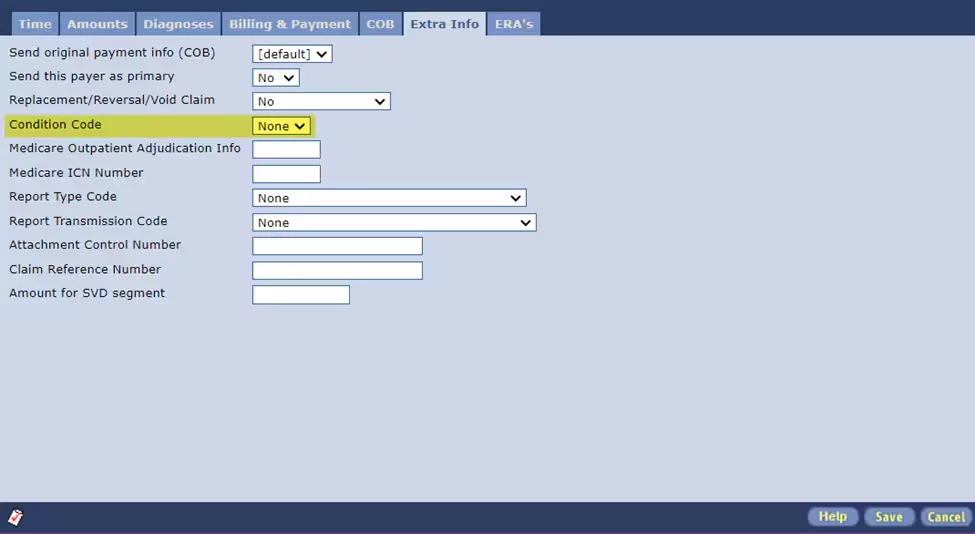
- Click the Extra Info tab.
- Select the Void or Replacement option.
- Select the appropriate Condition Code from the list below:
- Billing Type xx7: Use reason (condition) codes D0 (zero)-D4 and D7-D9.
- Billing Type xx8: Use reason (condition) codes D5 and D6.
Bill Type Reason Code Explanation xx7 D0 (zero) Change to service dates xx7 D1 Change in charges xx7 D2 Change in revenue codes/HCPCS - HIPPS xx7 only D3 Second or subsequent interim PPS bill - PPS inpatient hospital only xx7 D4 Change in GROUPER input (diagnoses or procedures) - PPS inpatient hospital xx8 D5 Cancel-only to correct a Medicare beneficiary identifier or provider identification number xx8 D6 Cancel-only to repay a duplicate payment or OIG overpayment (includes cancellation of an outpatient bill containing services required to be included on the inpatient bill.) xx7 D7 Change to make Medicare the secondary payer xx7 D8 Change to make Medicare the primary payer xx7 D9 Any other change xx7 E0 (zero) Change in patient status
- Complete all other information needed for replacement or void claim.
- Click the Save button.
- Resend Claims.
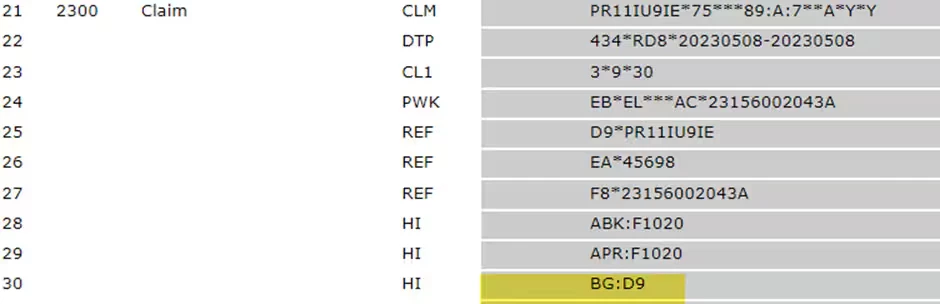
- Verify the condition codes are traveling on the claim as needed. They can be found in the 2300 Claim Loop in one of the HI segments.