


PERMISSIONS REQUIRED: You need the Billing permission to add a line to an account.
You can add a line directly to a billing account if you need to manually record charges, payments, or other credits that affect the account's balance.
NOTE: If your clinic has system-integrated payment processing, you can Process a Payment instead.
Jump to Section:
Add a Charge or Credit to an Account
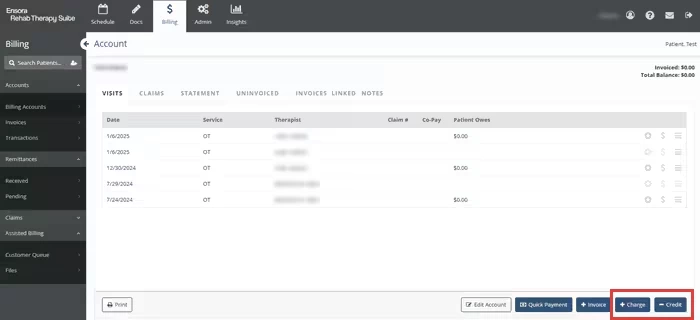
- Go to Billing → Accounts → Billing Accounts.
- Click the billing account you're working with.
- In the lower right, click the + Charge or - Credit button.
- Fill in information about the line.
- Click the Save Line button to save information about a cash payment or payment that was processed outside of the system. This is an option for clinics that are not enrolled in integrated payment processing.
- Click Record a Payment to save information about a cash payment or payment that was processed outside of the system. This is an option for clinics using integrated payment processing.
- Click Process a Payment to process a credit card payment. This is an option for clinics using integrated payment processing.
Clinics Enrolled in Payment Processing Clinic Not Enrolled in Payment Processing 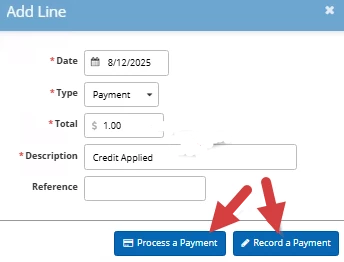
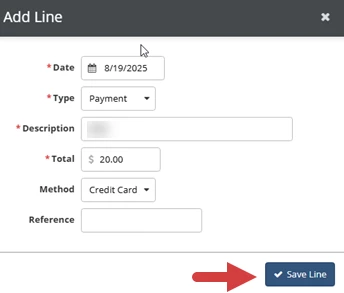
- Click the Save Line button.
- If you want to print or email a receipt, select the checkbox next to that option and click the Process Receipt button. Otherwise, click the Nope button.
About the Fields
| Field | Description |
| Date | The date of the charge or credit. |
| Type | Indicates what this charge or credit represents:
|
| Description | A description of the charge or credit that appears on statements and invoices. |
| Total | The total amount of the charge or credit. |
| Action | Choose whether to record a payment or process it through Fusion:
|
| Method | Indicates whether the charge or credit was provided by cash, credit card, debit card, check, or EFT. |
| Reference | A reference, such as a check number, for the charge or credit that appears on statements and invoices. |